
The bug report said: "App crashes on checkout, sometimes." That word — sometimes — is where a week of my life went.
It was a screen that worked perfectly on my device, in the simulator, on QA's phone, on every test account we had. But a handful of real users hit a blank screen at checkout and bounced. No crash log that pointed anywhere useful. No reproduction steps that worked twice. Just a screenshot of a spinner that never resolved, and a Slack thread that grew longer every day while nobody could actually see what was going wrong.
If you build mobile apps, you have lived some version of this. This is the story of why these bugs eat days instead of minutes — and what I eventually did about it, which is the reason Moni Proxy exists.
The Bug That Wouldn't Reproduce
Here's how that checkout bug actually went. We started where everyone starts: trying to reproduce it. We followed the user's steps. It worked. We tried a fresh install. It worked. We tried on slow Wi-Fi, on cellular, with a near-empty cart, with a huge cart. It worked, worked, worked.
Two days in, someone on the backend team noticed that some requests to the pricing endpoint were returning a slightly different JSON shape for accounts created before a certain date — a field that used to be a number was occasionally a string. The mobile app assumed a number, failed to parse it, and silently rendered nothing. No crash. No error. Just a blank screen and a user who left.
The fix took ten minutes. Finding it took four days. And the entire time, the thing we needed was sitting right there on the user's device: the exact response the server sent. We just couldn't see it.
Why the Network Layer Is Where Mobile Bugs Hide
After enough of these, a pattern became impossible to ignore. The bugs that took days were almost never UI bugs. They were network bugs wearing a UI costume. The symptom shows up on screen — a blank state, a spinner that never stops, a wrong total — but the cause is in the request or the response.
A few of the usual suspects:
- Authentication. A token that expired, was never attached, or was attached to the wrong request. The UI just shows "something went wrong."
- Unexpected response shapes. The backend changed a field, added a null, or returned an error envelope the client didn't expect. The app parses it wrong and fails quietly.
- Edge-case data. An empty list, a very long string, a missing optional field — data that only certain users have, which is exactly why it "only happens sometimes."
- Third-party SDKs. An analytics or ads SDK making calls you never wrote, timing out and blocking something downstream.
Every one of these is invisible from the outside. HTTPS is encrypted, which is great for security and terrible for debugging. You can't just watch the traffic and read it. So teams fall back to the worst possible tools: guesswork, and screenshots.
The Screenshot Problem
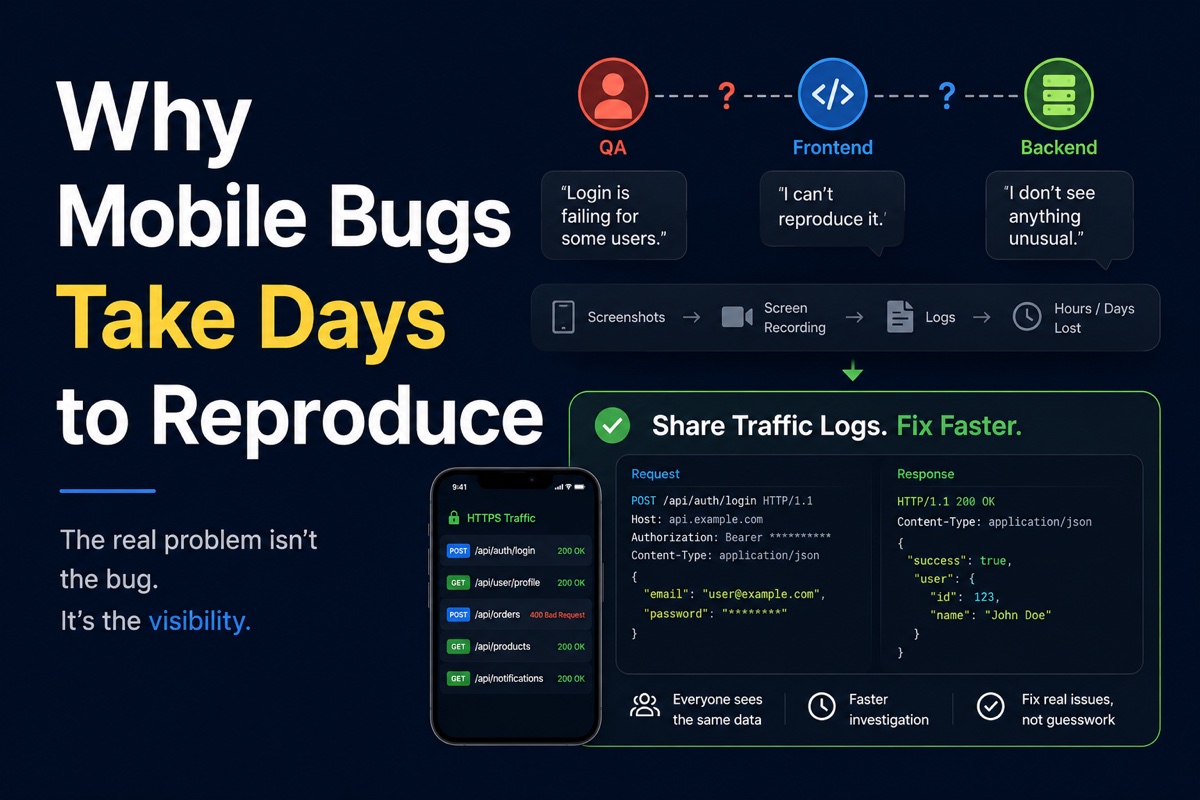
Think about what a bug report usually contains. A screenshot of the broken screen. Maybe a screen recording if you're lucky. A description like "it didn't load." None of that tells you what the device actually sent and received. It tells you the outcome, not the cause.
So the loop becomes: QA reports the symptom, frontend guesses it's the backend, backend guesses it's the client, everyone adds more logging, ships a new build, waits for the bug to happen again, and repeats. Each round is a day. Reproducing a network bug from a screenshot is like diagnosing an engine problem from a photo of the dashboard warning light.
What actually breaks the loop is being able to see the real request and the real response — the URL, the headers, the body, the status code — from the device where the bug happens. Once you can read that, most of these "impossible" bugs become obvious in seconds.
Why Capturing Traffic Used to Be Painful
The tooling to read HTTPS traffic has existed for years. I'd used desktop proxies plenty. The problem was never capability — it was friction.
To inspect a phone's traffic with a desktop proxy, you run the proxy on a computer, point the device's Wi-Fi proxy at that machine, install and trust a certificate authority on the device, and keep both on the same network. It works at your desk. It falls apart the moment the bug only reproduces on cellular, or on a tester's phone three time zones away, or on a real device out in the field. The setup is exactly where it's least convenient: away from the desk, on real hardware, under real conditions.
So in practice, the moment you most needed to see the traffic — a flaky bug on a real device — was the moment the tooling was hardest to use. That gap is what kept these bugs alive for days.
What I Wanted Instead
The idea behind Moni Proxy started as a selfish wish: I wanted to capture and read HTTPS traffic on the device itself, with no computer in the loop. No Wi-Fi proxy host to set, no shared network, no desktop app running. Just open an app on the phone, start capturing, and see everything.
That's what it does now. It runs a local proxy on the device using the platform's VPN and certificate APIs. You install it, trust the certificate once, hit Start, and every HTTPS request your apps make shows up decrypted — full URL, method, headers, query parameters, request body, and the response, all on the phone. Everything stays local; the traffic never leaves the device.
Going back to that checkout bug: with on-device capture, the whole investigation collapses to one step. Open the failing screen, look at the pricing request, read the response, and see the field that's a string when it should be a number. Four days becomes four minutes.
Reproducing on Demand, Not by Luck
Seeing the traffic solves half the problem. The other half is reproducing the failure reliably so you can verify the fix. This is where reading isn't enough — you need to control the response.
That's why Moni Proxy also lets you mock and rewrite. Once you know a malformed response causes the blank screen, you can create a rule that returns exactly that malformed response on demand, every time, and watch the app fail predictably. Then you fix the parsing, flip the mock off, and confirm. No more waiting for the bug to randomly reappear. If you want the full walkthrough, we wrote a guide on how to mock API responses on mobile.
This turns the worst kind of bug — intermittent, data-dependent, "works on my machine" — into something you can recreate at will. And recreating it at will is the entire game. A bug you can reproduce on demand is a bug you can fix and verify in one sitting.
It's Not Just an iOS Problem
Everything above applies equally across platforms, because the network layer doesn't care what language your app is written in. The same approach works whether you're debugging native iOS, Android, Flutter, or React Native — they all send standard HTTPS, and capturing on-device shows the real wire traffic for all of them.
If you want the platform-specific steps, we have walkthroughs for capturing HTTPS traffic on iPhone, on Android, debugging Flutter API calls, and React Native network requests.
The Real Goal: Shorten the Loop
I didn't build Moni Proxy to replace desktop proxies — they're great tools and plenty of teams will keep using them. I built it because the most expensive bugs are the ones nobody can see, and the fastest way to see them is on the device where they happen, with zero setup standing in the way.
Mobile bugs take days to reproduce when you're debugging blind. The moment you can read the traffic and reproduce the failure on demand, "sometimes" stops being a mystery and starts being a one-line fix. That's the whole point.
Frequently Asked Questions
Why do mobile bugs take so long to reproduce?
Because the hard ones live in the network layer — a missing auth header, an unexpected response shape, or edge-case data — and HTTPS traffic is encrypted and normally invisible on the device. Without seeing the real request and response, teams debug blind with screenshots and guesswork, which stretches the loop to days.
How can I reproduce a mobile API bug faster?
Capture the device's HTTPS traffic to see the exact request and response, then mock or rewrite the response to recreate the failing state on demand. Doing this on-device with Moni Proxy removes the desktop proxy setup and turns a multi-day hunt into a few minutes.